Business & Professional Toastmasters
Club#1169
Metairie, Louisiana
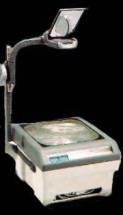
Overhead Projector Usage
There are many a time when (for better or worse) a speaker
decides to use an overhead projector to enhance a presentation.
This, more often then not, can destroy not only the presentation
but the integrity of the speaker, if not handled properly.
Overheads are a powerful tool in a presenters arsenal. They help
convey ideas, drive particular points home as well as giving one
the ability to display charts, graphs and pictures clearly. The proper use and preparation is of utmost importance when using
a tool such as this.
Here are some points you must ask yourself before using this
tool:
1. Is it necessary for me to use an overhead projector?
2. What value does the projection add?
3. Could more value come from using flip-charts, posters
or handouts?
Now, if you have decided that an overhead is necessary, this is
what you must do:
1. Get Your Thoughts In Order
2. Make Up Your Transparencies
A) don't put your whole speech on transparencies, just key
points and ideas
B) limit each visual to one idea
C) keep transparencies simple - no more than six lines per
transparency, no more than six words on a line
D) use 18 point type or larger to make it easy to read
E) don't use more than two type styles on any single
visual
F) mix upper-case letters for easy readability
G) use a common background theme for associated
transparencies and ideas
H) don't use exclamation marks, even from a short distance,
they look like the number one
3. Pre-Test Your Hardware So You Know It's Working
A) use a graphic image with text (one not used in your
presentation) to test equipment and focus
B) most overheads can only effectively project for a distance
of up to 20 feet; make sure your projector is within that
space
4. Position Material On The Upper Part Of The Projection
Surface
5. View Your Overheads From All Angles, Especially The Sides And
Back Of The Room, To Ensure They'll Be Clearly Read By Everyone
6. Don't Turn Off All Room Lights When Using A Projector
A) if this is not possible, bring a lamp or two on low dimmers to help your audience see you; this also allows you to see any notes you may be using
7. Turn The Projector Lamp Off While Changing Slides Or During
Discussions
8. Never Stand Or Place Anything Between The Projection And
Screen Or Wall As It Visually Distracts And Distorts
Information
A) when you must point to details on overheads, use a pen or
pencil, place it on the slide and get your hand out of the
picture
B) If someone is working the projector for you, use a laser
pointer to point at the screen but keep in mind that this can
eliminate the color red from your slides
9. Give People Time To Read And Mentally Process What's On The
Screen
10. Talk To Your Listeners Not The Screen
Notes:
Although this list is not complete, it will help get you started with your presentation.
Information and thoughts on this page were submitted
by William
Corey,DTM.
All rights reserved.
Attention! -- Important Site Information - Please Read! -- Attention!
Be it known...
as of October, 2011, due to
changes within the club and the organization, the information
contained within this site may no longer be completely accurate
(including, but not limited to - meeting location, what it is
that we offer our members, possible changes to disclaimers used,
and compliance with newly-imposed guidelines). As such "This
Is Not A Toastmaster Int. Approved Club Website!" Yet, it
will remain in this current form to honor our past, as long as
possible, and to serve as a reminder of the uniqueness,
individuality, standards, professionalism, regards for others'
privacy, and knowledge that this club's long line of members once enjoyed, shared and promoted during our history. To see the new site featuring Toastmasters Int.'s created/designed/approved web template and information - click here!
Thank you for your consideration.
Toastmasters International would like you to know the following about its' name,
logo, trademarks and copyrights...
"All rights reserved. Toastmasters International, the Toastmasters International logo and all other Toastmasters International trademarks and copyrights are the sole property of Toastmasters International and may be used only by permission."
They also desire us to inform you of the following in regards to "member information"...
"The information on this Web site is for the sole use of Toastmasters' members, for Toastmasters business only. It is not to be used for solicitation and distribution of non-Toastmasters material or information."
Business & Professional Toastmasters Club#1169 would like you to be aware of this...
This club website is intended for use by members as well thoes who wish to learn about us!
We value the privacy of our members and guests, and do not send un-solicited e-mails.
The information and links contained on this site have been submitted and voted upon by our membership before inclusion. However, it should be noted that what is offered and /or linked to is not necessarily recommended or endorsed by all B&P Club#1169 members / the Toastmasters organization, or Toastmasters International.
© Business and Professional Toastmasters Club#1169 Website Committee 1999 through Oct. 1, 2011
(unless otherwise noted)
Site Designed By William Corey's Ripples In Designs Eclectic